

How to recognise phishing emails pretending to be Maileon
Phishing attempts have become an unfortunate constant in today’s digital landscape. Even reputable brands are targeted by criminals who try to impersonate them to steal credentials, spread malware, or trick users into clicking harmful links. Recently, third parties have begun circulating fraudulent emails that mimic the Maileon design and communication style. These messages aim to create urgency, raise fear, and lure users into entering their login information on fake websites.
At Maileon, safeguarding our customers and partners is a top priority. This article explains how these attacks work, how to recognize them, and what to do if you ever encounter one.
How the Recent Scam Works
Attackers send emails that appear to come from “Maileon Support” or similar names.
These messages often claim that:
- Your account has been suspended
- Your sending capability has been disabled
- You must “reactivate” your account
- You need to click a button to restore service
The emails typically include a button linking to a fake login page resembling Maileon’s interface. Once the attacker obtains your credentials, they can access your account or attempt to use the same password elsewhere.
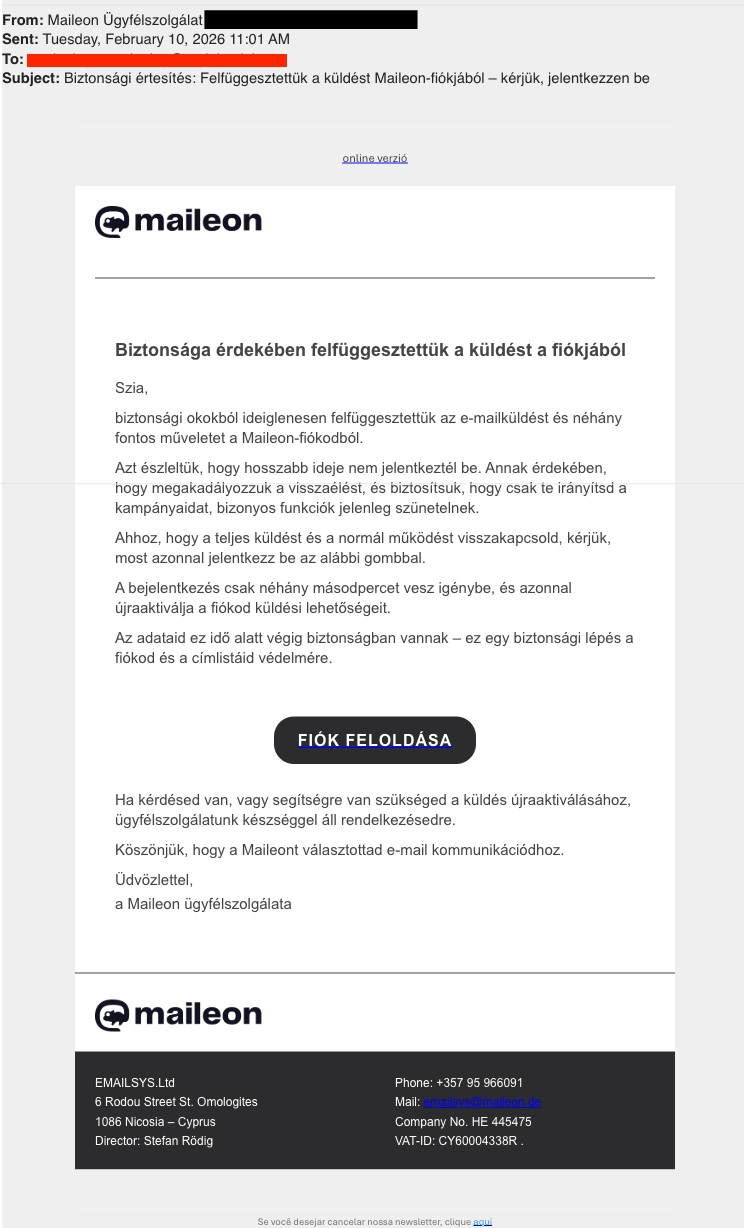
Note: The footer information visible in the screenshot comes from a legitimate Maileon sales partner in Cyprus. The scammers copied this publicly available company data to make the phishing email appear more credible. The partner is not involved in these attacks; their details were simply misused.
How to Identify a Fake Maileon Email
Even well-designed phishing emails almost always contain red flags:
Suspicious Sender Addresses
Maileon never sends official security notices from free-mail domains or unrelated third‑party addresses.
Unexpected Urgency
Messages that try to pressure you into clicking immediately (“your account will be deleted in 24 hours”) are a strong warning sign.
Strange or Incorrect Links
Always hover over links before you click. If the URL does not point to an official Maileon domain, do not open it.
Unusual Language or Formatting
Some phishing emails contain typos, grammar inconsistencies, or unusual phrasing. Others look polished but use outdated or incorrect Maileon branding elements.
Important: Legitimate messages from Maileon (XQueue GmbH) are always sent exclusively from the domains maileon.com or xqueue.com.
If an email claims to be from Maileon but comes from any other domain, it should be treated as suspicious.
What Maileon Does to Protect You
To ensure transparency and awareness, we already:
- Display in‑app security notices when phishing attempts are detected
- Block suspicious activity patterns
- Work with partners to identify fraudulent domains quickly
Nevertheless, no technical measure is 100% effective against social engineering – which is why user awareness remains the strongest defense.
What You Should Do If You Receive a Suspicious Email
- Do not click any links
- Do not reply
- Forward the message to your security team or IT
- Report it to Maileon via your established contact channel
- Delete the email afterwards
If you are ever unsure whether a message is genuine, contact us directly (service@xqueue.com) – we are here to help.
Important: At this time, no Maileon accounts have been compromised through these phishing attempts or through any other form of attack. We are publishing this article to raise awareness, support safe user behavior, and maintain the trusted, secure, and productive environment that our clients value.




In need of support?
Our Service-Team is happy to help you with any questions! If you search for specific documentations, also feel free to check out our Maileon Help-Center.
